
Your Apple Music artist page is now yours to design
iOS 27 turned the Apple Music artist page into branded space. Three settings control it — an artist logo, a button colour and a pinned Spotlight — and Apple rejects logos for twelve specific reasons. Here is what to submit, where to click and when.
Apple Music redesigned the artist page in iOS 27, and for the first time the page carries your branding instead of a template. Three settings do it: an artist logo in place of your typed name, a button colour taken from your artwork, and a Spotlight slot that pins one release to the top. All three are free, all three live in Apple Music for Artists — and most artist pages still have none of them switched on.
This guide is built on Apple's own artist documentation: the specifications, the review times and the full rejection list below are Apple's, not an estimate.
What actually changed
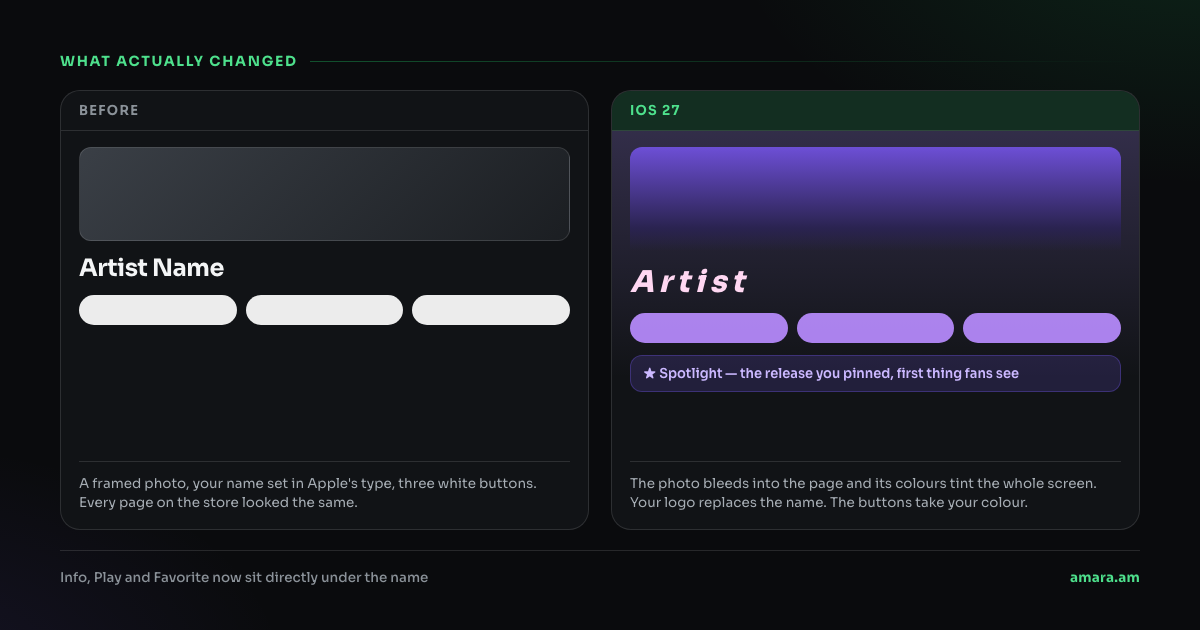
The old page framed your photo in a box, printed your name in the system font, and gave every artist the same white buttons. The new one bleeds the photo to the edge, replaces the typed name with your logo, colours the Info, Play and Favorite buttons the way you choose, and adds a Spotlight strip under the header.
The three settings you control
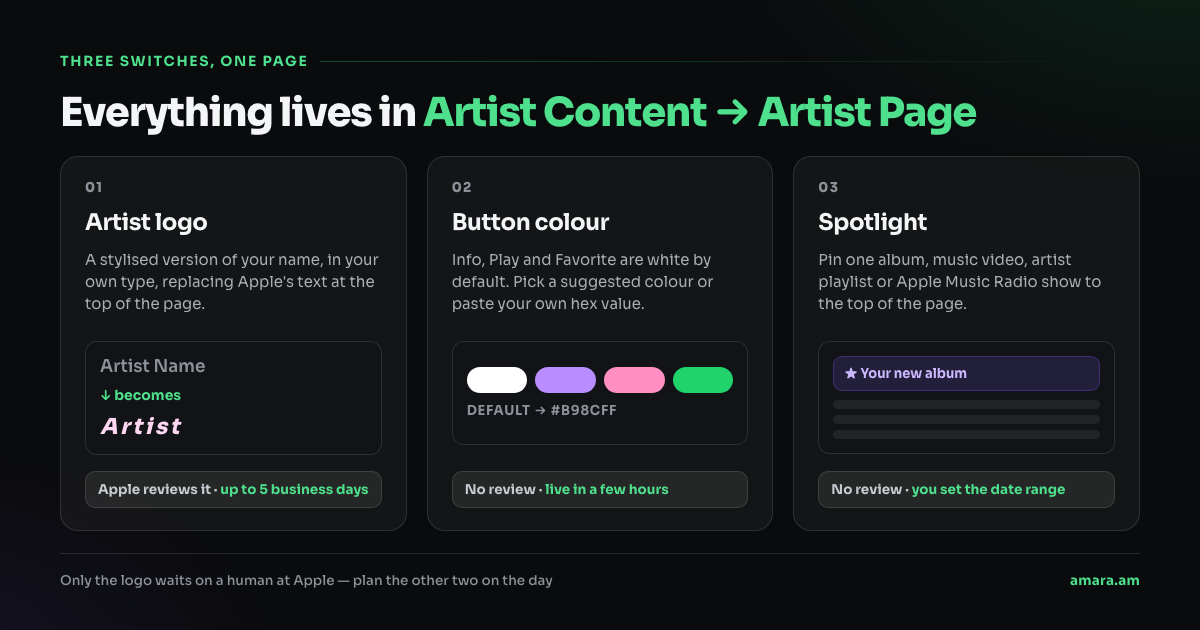
The timings matter more than they look. The logo goes through Apple's review and can take up to five business days — so it is the one thing you cannot do on release morning. The button colour is live within a few hours, and the Spotlight takes a date range you set yourself.
Where to click
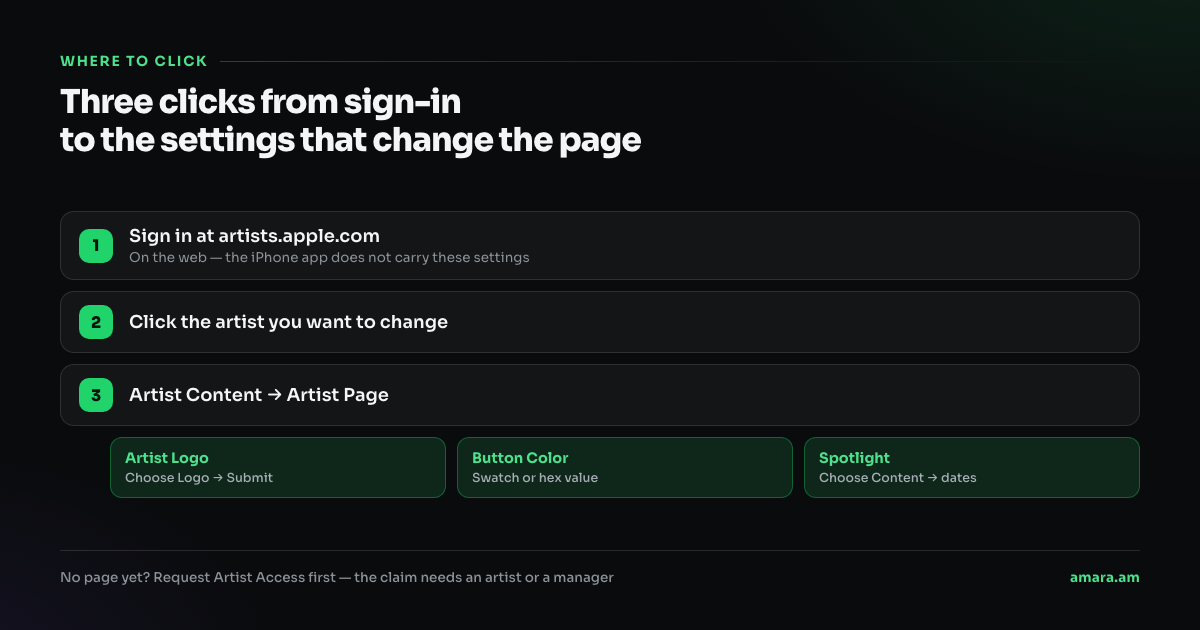
Sign in at artists.apple.com, click the artist you want to change, then open Artist Content → Artist Page. The three sections sit there: Artist Logo, Button Color and Spotlight.
If you do not have access yet, request it first. Apple grants an artist account to the artist or their manager, your music has to have been live for at least five business days, and a request that nobody actions expires after 30 days.
1. The artist logo
This is the only one with a real specification, and it is where submissions fail. The logo is a text treatment of your artist name — your name, set in your type, as an image. It is not a symbol, not a crest, not your album cover.
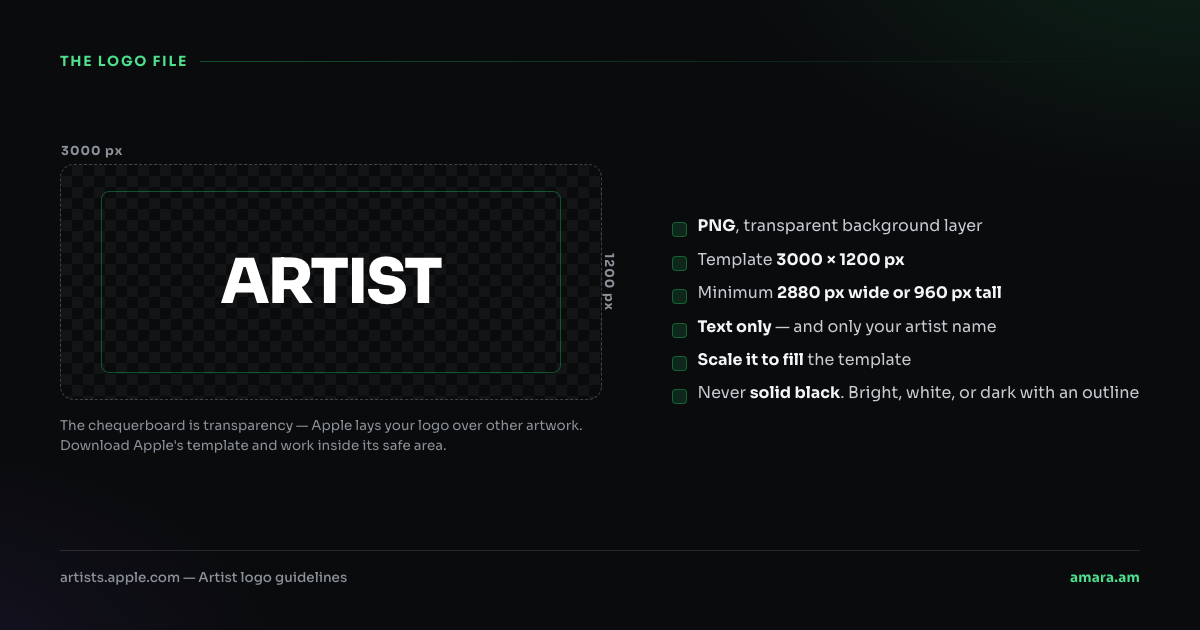
Apple lays the file over your header artwork, so the background layer has to be transparent — a white box around your name is the most common avoidable rejection. Keep it bright, white, or dark with an outline; a solid black logo disappears on a dark header.
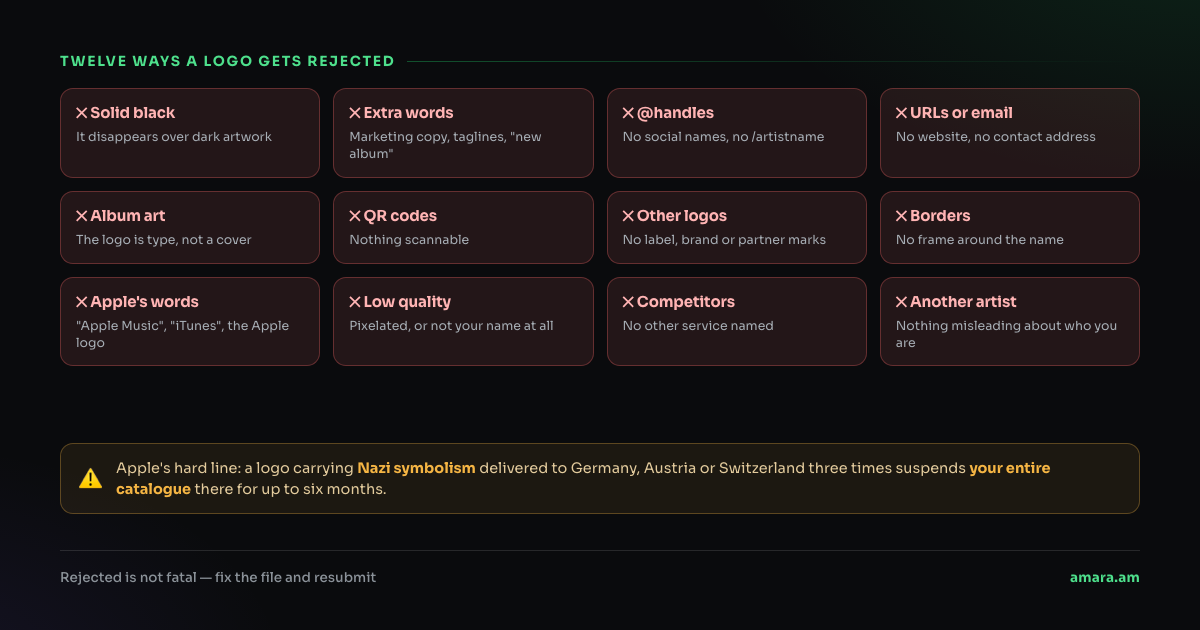
Read that list before you design, not after. A tour date, a label logo, a QR code, a social handle, "New album out now" — all of them are the same rejection, and you only find out at the end of the review. You can resubmit as many times as you like, but the page stays on the default while it sits in Pending.
2. The button colour
The Info, Play and Favorite buttons on your page are white unless you say otherwise. Apple offers suggested swatches pulled from your artwork, or you can paste a hex value. Take the hex from your cover art rather than inventing one — the point is that the page reads as the same object as the release.
There is no review here. Set it, and it is live in a few hours.
3. The Spotlight
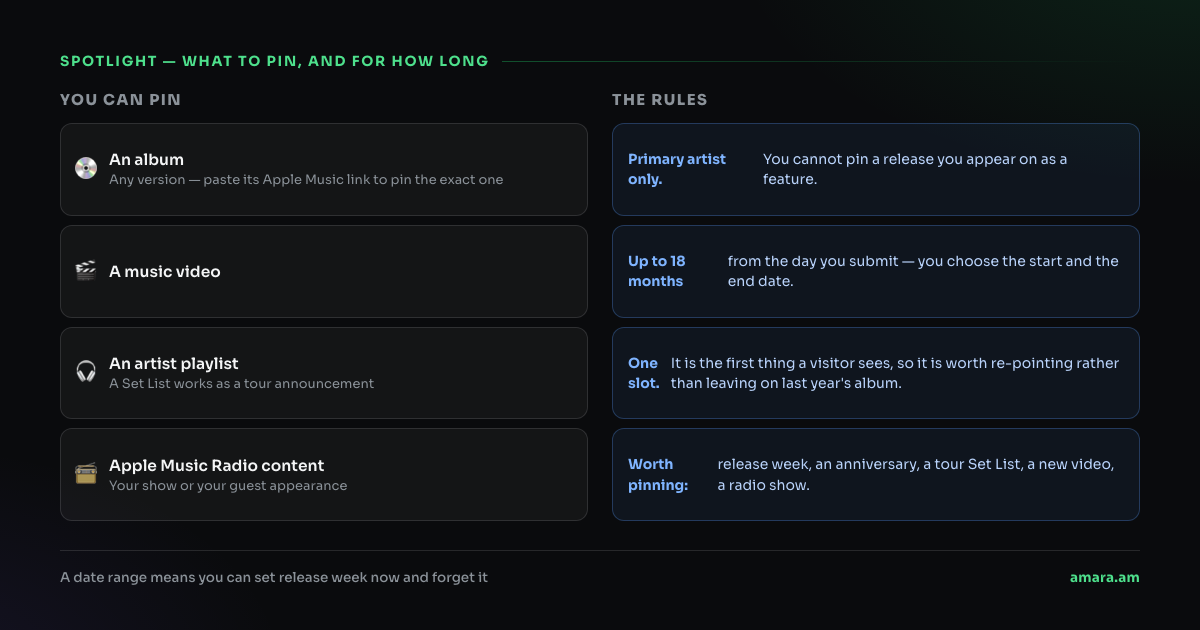
Spotlight pins one item to the top of the page: an album, a music video, an artist playlist or Apple Music Radio content. You have to be the primary artist on it — a track you appear on as a feature cannot be pinned. To pin a specific version, paste that version's Apple Music link rather than searching for the title.
The date range runs up to 18 months, and you choose the start and the end. That is what makes it worth setting in advance: the Spotlight can be scheduled to appear on release day and retire itself when the campaign ends.
Why this is worth an hour
Every link you send — a press email, a story swipe-up, a playlist pitch, a bio link — lands on the artist page. Until now that page said the same thing for everyone. Now it either carries your name in your own type with your release pinned at the top, or it carries the default, and the difference is visible in the first second, before anyone presses play.
It is also the cheapest branding you will do this year. There is no fee, no distributor involved, and nothing to renew.
A release-week plan that clears the review
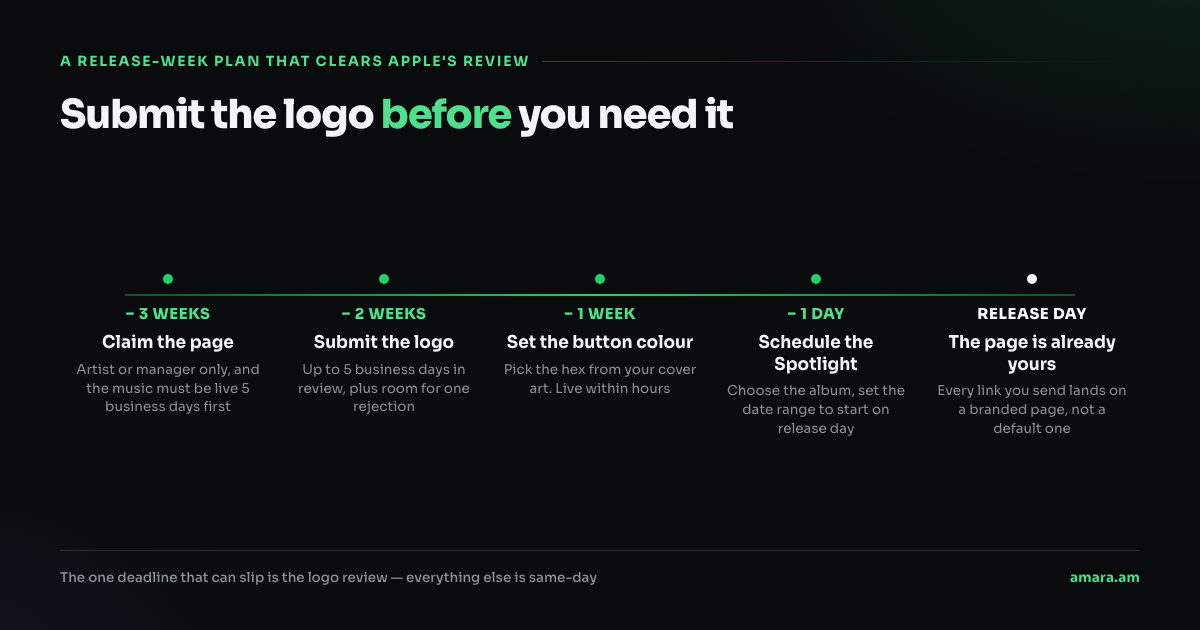
Work backwards from the release date. Claim the page three weeks out, submit the logo two weeks out so there is room for one rejection, set the button colour the week of, and schedule the Spotlight the day before with a start date of release day. On release morning there is nothing left to do.
If you are an Amara artist and you are not sure whether your Apple Music for Artists access is in place, write to us and we will check it with you.
Source: Apple Music for Artists
Also reported by: Apple — Artist logo guidelines, Music Ally, RouteNote, 9to5Mac
Read next

YouTube Music adds conversational AI search and a weekly podcast guide
At Made On YouTube, the company announced Ask Music and an AI podcast lineup, both described as coming soon to YouTube Music and Premium subscribers worldwide.
Read →
Spotify opens Fresh Finds Forward to independent artists on its discovery playlists
Artists added to Fresh Finds playlists from 1 January 2026 can join a 12-month support program through Spotify for Artists.
Read →
Apple Music in iOS 27: redesigned artist pages and a Friends playlist
Apple Music's iOS 27 update reworks artist pages and adds a listener-driven weekly playlist, two surfaces that touch discovery.
Read →